December 04, 2003
Zombie Process
Have you ever wondered what in the world is a "Zombie Process"? If you have, then you will get your answers here. :)
I will start with an interesting find about 'zombie process' in the Internet:
A zombie is already a dead process. No wonder it could not be killed eh? To put it in more elegant words, I found this explanation online:
> When I run top, I have a zombie process (it's a cron job that does my
> nightly backup) running and I need to kill it. I have tried kill -9
> , but it doesn't work. Any ideas? Thanx.
You cannot kill it because it already is dead. That is why it is called a zombie. ;^)
To be technical, a zombie process is one that already has terminated via an
exit() system call or uncaught signal. In order for it to "go away" (be removed from the process table, its parent must do a wait() system call or one of its variants.
The ultrasecret reason for this is that the zombie contains some statistics on the process such as the exit status (why it died) and CPU time used that must be returned to the parent and this is stored in -- guese where -- the zombie's per-process structure. This is why it cannot be removed until the parent does a wait() on it.
Sometimes a parent fails to do the wait(), usually due to a programming bug. Any old C program can do a fork() and not do the wait() and cause this. It used to be a problem with shell scripts doing "foo&" and never waiting back in the dark days of older UNIX systems.
In your case, perhaps cron has gotten confused (bug) and lost track of its children so it is not correctly waiting for them to complete.
As the other poster suggested, restarting cron will start it thusly:
/etc/rc.d/init.d/crond stop
sleep 1
/etc/rc.d/init.d/crond start
should do it. This works because if a process dies (e.g. crond) then init (process 1) inherits its children and init will do the wait correctly.
For the impatients, the above will suffice. But, this merely tells you: why the process went into a 'notorious' ZOMBIE mode anyways!
For those who are 'brave at heart' and share the same ideology as 'the truth is out there...', here is a bit more technical explanation:
If your process table is showing an abnormally high number of defunct processes, and if the problem recurs even after rebooting, it is advisable to determine the cause. Look at the PPID (parent process ID) for the defunct processes and try to find out why its child processes are becoming defunct. Examining the process table (ps -elf), grepping for the parent process in the rc scripts, and making use of utilities such as u386mon or cpqmon should help.
Most likely the process has gone to sleep at a priority below PZERO, therefore signals will never reach the process and it will remain unkillable.
For further explanation of what this means, read the following.
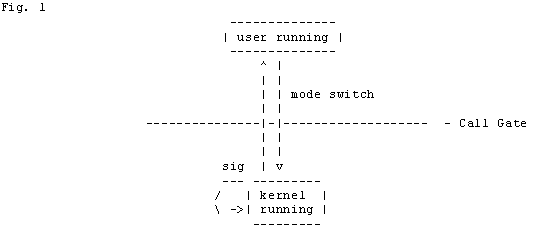
To start with, processes run in two modes: user mode and kernel mode. When a process is in user mode it responds to interrupts and signals. When a process in user mode receives an interrupt, or a signal or makes a system call, it goes through a call gate to enter kernel mode and executes the kernel code (see fig. 1).
Once a process is in kernel mode it ignores all interrupts and signals until it is about to return to user mode. Most kernel functions execute quickly, and upon exiting kernel mode, they handle all interrupts and signals. After running for a maximum of one second, the process is preempted and is returned to the runqueue. Since kernel functions execute quickly this is not typically the cause of unkillable processes. To understand this, it is necessary to go into more detail about what goes on in kernel mode.
The following diagram (fig. 2) will be useful in understanding the details of what goes on in kernel mode. You may wish to print it out. A similar, easier to read, version of this diagram can be found on the cover of Maurice Bach's book _The Design of the UNIX Operating System_.
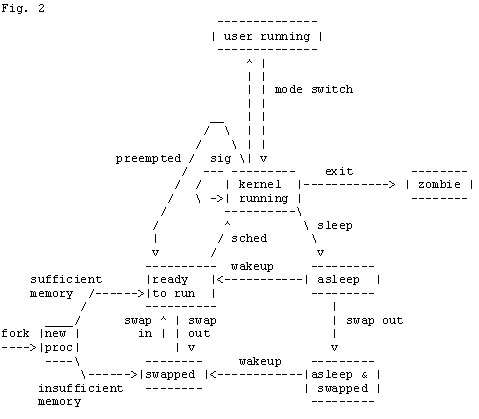
When a process is in kernel mode it may do a number of things. The first possibility is that it will just run some kernel code. In this case it will quickly run the code and then return to user mode or, if the program has finished, it will exit. Immediately after exiting a process is what is called a "zombie". Typically this will show up on your ps as a
Sometimes a process needs some resources that are not available at the time. If this is the case, the process is put to sleep. When a process goes to sleep it waits on an address and at a priority. This address is the value that appears in the field WCHAN when ps(C) is run with the -l option. This address is determined by the device driver that has been called and is typically the address of a local variable in the device driver.
If the process is sleeping at priority above PZERO, which is defined in /usr/include/sys/param.h, and the process receives a signal, the process is put back in the runqueue, and when it is run it returns to user mode. As it returns to user mode the signal is handled, and if a kill -9 has been sent, the process is killed.
If a process is sleeping at a priority below PZERO, signals will not cause the process to be woken up. The priority that a process sleeps at is determined by the device driver that has been called. The device driver should only put a process to sleep below PZERO if it is certain that the resource will be freed quickly so that the process can be woken up. If the process that you are trying to kill is sleeping below PZERO it will only be woken up when the resource it was waiting for has been freed. Once the process is woken up, it is put back on the run queue, and when it gets to run and as it returns to user mode, the signals are handled. If the process is never woken up by the driver the signals will never reach the process and it will remain unkillable.
The only other reason a process may be unkillable is if the process is being ptraced. The kernel will only ptrace a process on the behalf of a user process. Ptraces are for the most part only performed by debuggers.
The above "technical" explanation might scare someone or might encourage someone. That depends on how "brave" are you "at heart". :)
Now I will finish with the "excerpts from the Internet" with these last two:
In unix-like operating systems, ALL processes (apart from the first one) are created by other processes. To create a new process, a current process does a fork(2) system call. The kernel then creates the internal structures needed in the process table. Often, the parent process does a wait4(2) system call, which means it waits for the child process to finish. This means you can get a little info about the process after it finished, like cpu time, etc.
If you don't care when the process finishes, you have to explicitly say so, otherwise the kernel will keep the info in the process table expecting your process to eventually call wait4(2) or a similar function. A process that has finished (and so is using no memory) but has not yet been "reaped" is called a Zombie, and the kernel is keeping its process table entry alive.
Two ways to avoid creating Zombies (other than calling one of the wait() functions) include:
- handling the SIGCHLD signal
- fork(2) and then get the child to fork(2) again and then exit immediately, so that you've created a grandchild rather than a child.
Zombie processes will show 'Z' in the STAT column of ps -aux
> A zombie is a process which has exited, but its parent
> process has either not called wait(2), waitpid(2), or has not set up the
> signal mask to ignore SIG_CHLD. If the parent process does not "reap"
> its children by calling wait(), etc., then the *only* way to make the
> zombie processs go away is for the parent process to terminate.
>
> Zombie processes are not normally a big problem, and as long as there
> are only a few of them then they can be blissfully ignored. Each
> zombie, however, will take up a slot in the kernel's process table, so
> if there are more than a few, or if they are increasing over time, then
> you need to figure out who the parent process is and see what can be
> done to make it either call wait(), ignore SIG_CHLD, or failing that,
> see if you can do without it.
>
> -- Steve McCarthy
> sjm@halcyon.com
> www.halcyon.com/sjm
These two last excerpts may give you an overall idea about Zombies.
To finish what I have started, I will list out the main cause why this Zombies are born in the first place and steps to take actions against them.
Why Zombies are born:
- Simply Bad code in the responsible parent (daemon).
- There's a hardware problem, thus the process that was handling the hardware became Zombie.
Actions that can be taken:
- Find the responsible parent process (service) and restart it or kill it. To find the parent process issue: 'ps -elf'
- If zombies keep coming back even after restart of the service (parent process), try rebooting the machine.
- If the zombies keep haunting you even after a reboot, then try looking for an update of the service that is creating the zombies and update the service (or patch it).
- If all of the above fails, then it time to look for a possible hardware problem. Best way to start is to find out what hardware that specific process (service) will use.
- If you are unable to find the root cause, then depending on the number of zombies you can start living with them. Few zombies won't bite you to death.